Income and expenses
 A1 proofreading not yet effective for this page. In the meantime, you can ask any questions on the forum.
This screen displays all incoming and outgoing payments in the income or expense class, by accounting code or account assignment.
Using the screen
Access : Accounting → Control panels → Income and expenses
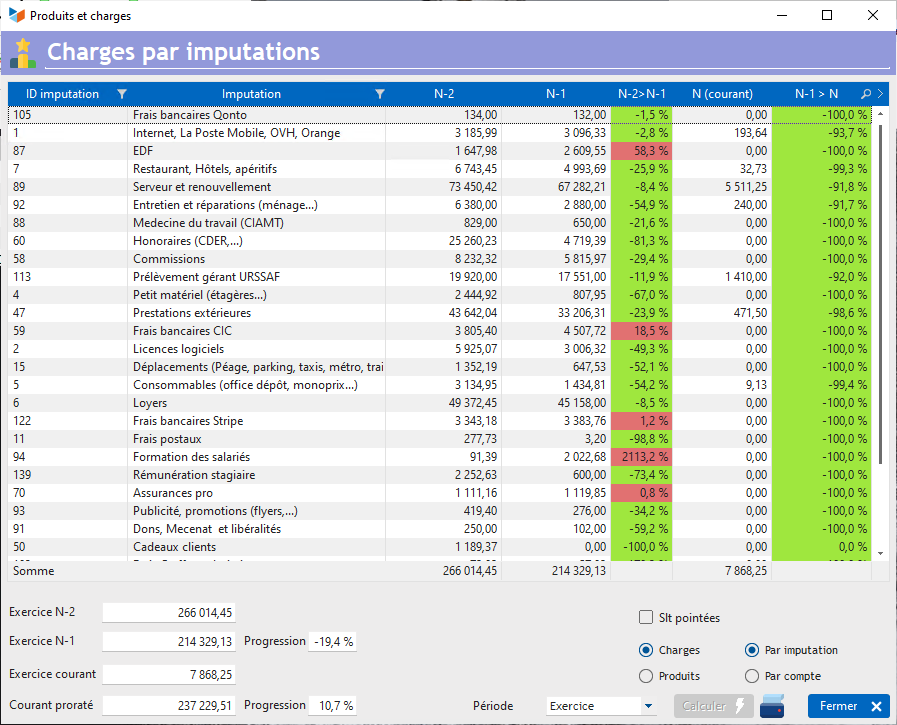
The Calculate button totals, by accounting code or allocation, all cash receipts and disbursements recorded, if they are allocated to an expense account or an income account (7 and 6 respectively in France).
Results are calculated for 3 periods: fiscal year N-2, fiscal year N-1, and fiscal year N, or according to the Period selected by the combo.
The N-2→N-1 column shows the percentage progression from N-2 to N-1, while the N-1>N column shows the progression between the previous period and the current period, which is not necessarily over.
 Other “Accounting ” articles
Accounting document options
Accounting entries
Accounting journals
Accounting links
Accounting settings
Accounting with Gestan: basic principles
Automatic accounting allocations
Bad debts
balance
Bank account details
Bank account statements
Bank reconciliation
Billing by tax rate
CFONB Export
Chart of accounts
cptresultat
Delivery of checks
Documents without imputation
Double-entry bookkeeping
Exporting and importing accounting data
Fixed assets
For further information
General Ledger
Income and expenses
Lettering
Log codes
Mass links: entries
Micro-Enterprise / Self-Enterprise
Payments
Pointing of supporting documents for VAT
Posting entries
Receipts/Payments
Recording WEEE
Review of entries
SEPA Export
Third-party balance
VAT Calculation
VAT statements