Exporting and importing accounting data
Most small businesses (up to around 50 employees) have their accounts outsourced to an external accountancy firm that uses specialised accounting software.
With Gestan, you will be able to send your accountancy firm all the double-entry accounting transactions generated from the data entered into Gestan, in the format required by the software used by your accountant: this means your accountant will not need to re-enter any data to access your records in their own software.
Gestan is therefore compatible with virtually all major accounting software packages on the market. The following export formats are available:
- XIMPORT: a very common generic format, used in particular by CIEL / EBP / SAGE (.txt file)
- APISOFT Winapi Huit (.txt file, with ‘;’ as the separator)
- CADOR DORAC (.txt file)
- CEGID Expert (Excel General Ledger – Format 2) (.xls file)
- CER France POMO Accounting (.txt file)
- CIEL Compta Evolution (.txt file)
- ComptaXL (.csv file)
- EBP V3 for Windows (.txt file)
- Fiscal légal (FEC) (.txt file)
- IBIZA SaaS Accounting (.csv file)
- ISACOMPTA by Agiris/Isagri (.ecr)
- ISACOMPTA by Agiris/Isagri V13.60 (.ecr)
- ISTEA 2016 (.txt file)
- ISTEA Accounting (.xls file)
- QUADRATUS QuadraCompta (.txt file)
- PRESTIGE by COGESER (.xls)
- SAGE Coala (.txt file)
- SAGE 100 i7 105 characters (txt→pnm files)
- SAGE 100 i7 164 characters (txt→pnm files)
- ACD’s SuiteExpert (.xls file)
- WINFIC V2.10 and later and WINSIS (Fiducial) (FichierEcriture.win file)
- W-DIAMANT Accounting (.xls file)
Furthermore, it is possible to export the data in standard spreadsheet format, allowing it to be reformatted for use with any other software.
Allocation to accounts
Allocation to accounts in the chart of accounts is automatic.
To ensure this allocation is correct, it is important to set up the account allocations and, if necessary, the specific accounting links.
It is recommended that you configure these settings in consultation with your accountant.
Using the screen
Access : Accounting → Export → Export XIMPORT
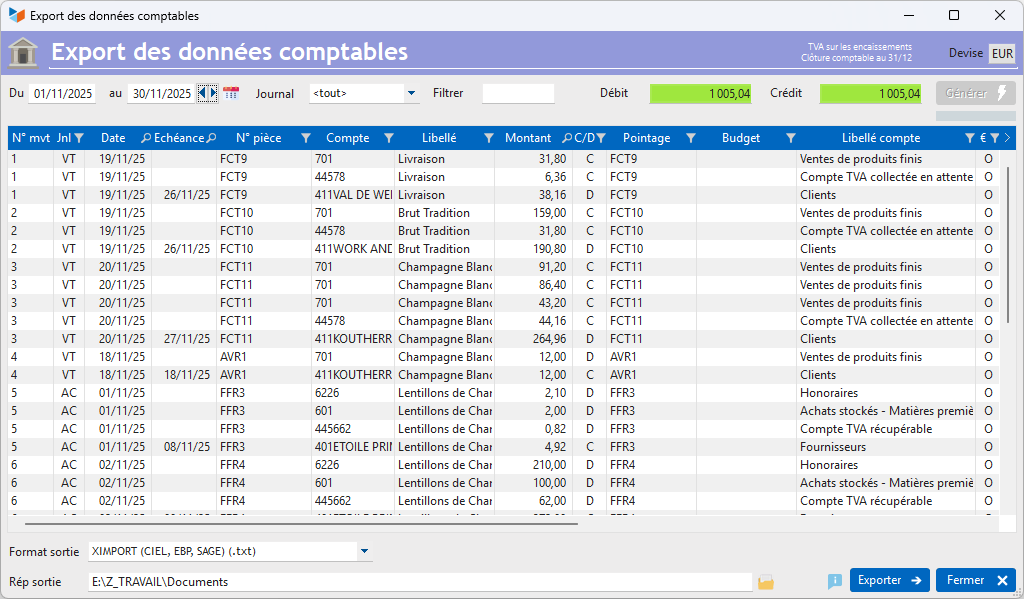
The Generate button extracts data for the specified date range. You can use the Filter field to specify the account (e.g. 411), accounts (e.g. 61*), or range of accounts (e.g. 61–62) you are interested in. You can also filter the export by a Journal .
 Use the context menu on the screen to access the options for generating accounting documents.
The results can be displayed in any currency other than the accounting currency by right-clicking on the Currencyfield.
Invoices and credit notes (customer and supplier) will be automatically linked to the default account assignment (and therefore to the corresponding accounting codes – main account, contra account and journal code) specified in the general settings. Once at least one journal entry has been posted to the document, the invoice will be reclassified if necessary according to the account allocation of that first entry, unless an accounting link s the document to a different account. Invoice account assignments can be modified via the document account allocation screen.
For VAT on receipt, only settled documents (invoices, credit notes, supplier invoices and supplier credit notes) will be taken into account. Otherwise, all documents with the ‘transmitted’ status will be taken into account. Documents with the ‘draft’ status will always be excluded.
The table displays the following information:
- Transaction ID: generated automatically; it is not stored
- Journal code: derived from the document’s account assignment or from the journal entry
- Entry date: the document date or journal entry date
- Due date: the document’s due date
- Document number: the document number, for a document, or the document number linked to the journal entry, for a journal entry. This document number consists of a letter and digits. This is the document’s internal number, prefixed by “C” (customer invoice), “A” (customer credit note), “F” (supplier invoice) or “W” (supplier credit note).
- account number: the chart of accounts code, possibly suffixed with the customer ID.
- description: the description of the entry: nature of the document, or description of the entry (or third-party description, depending on the option selected)
- Amount: the relevant amount
- C/D: C or D depending on whether it is a credit or a debit
- Reference: the document number if it is a document, or the entry number if it is an entry. In the latter case, it is prefixed with ‘E’ (E456, for example)
- budget: budget code (for journal entries)
- account description: the description of the chart of accounts entry
- Euro: contains the character 0
- General: the general ledger account
- Subsidiary: the subsidiary ledger account
- Third party: the third party’s name
- Payment method
 It is your responsibility to check the export data before importing it into your accounting software!
Gestan For sales, it handles VAT schemes on debits, receipts and the option on debits. However, for purchases, Gestan only handles VAT on debits and receipts.
Export options
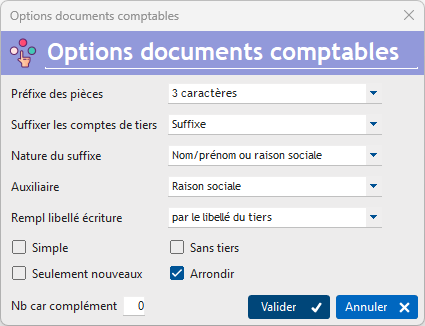
The table’s context menu offers the following options:
- to prefix documents with 1 or 3 characters
- to add a specific suffix to third-party accounts, the nature of which can be specified (for GDPR compliance, it is advisable to use the customer ID as the suffix).
- to add a suffix to subsidiary accounts
- to replace the entry description with the third party’s name or the cheque number
- to pad accounts with a configurable number of zeros: for example, if you prefer to see 70600000 rather than 706, simply set the option to pad to 8 characters
If the box Simple is ticked, the export will be carried out without detailing the revenue accounts (see example of a customer invoice) (only tick this box if you are fully aware of the implications).
If the No third parties is ticked, journal entries for third-party accounts will not be generated.
If the New only is ticked, the export will be limited to items that have not already been exported.
Round allows you to force rounding for each entry if necessary. Gestan, in fact, stores monetary data with all its decimal places, in order to process this data accurately. However, in some cases, there is no mathematical solution, and the journal entry may not balance due to rounding discrepancies. This tick box allows you to conventionally assign the rounding discrepancy to the most relevant tax account entry (the one with the highest amount, excluding credit/debit pairs with transactions of the same amount).
Suffixing via the PCG account
Via the VAT rates management screen, it is possible to specify a PCG account suffix.
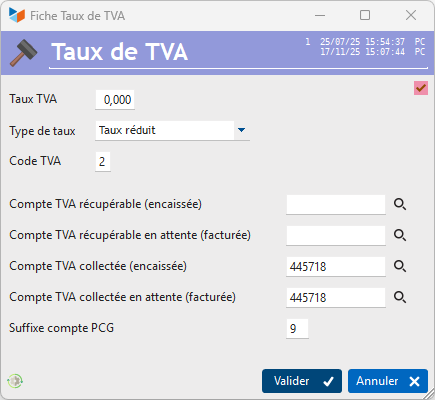
When exporting accounting data, for revenue class entries (excluding the discounts granted account), the account will be suffixed with the PCG suffix.
In the example above, if the revenue account is 708 and the VAT rate for the entry is 0, it will be posted to account 7089.
What should you do if the export is out of balance?
If the export is out of balance, the credit and debit total fields are highlighted in red.
If the discrepancy is only a few pence, it is most likely due to a rounding error on a document or a journal entry.
The first step in investigating this is to identify the document and/or journal entry causing the discrepancy. To do this, rerun the process over shorter periods until the unbalanced transactions are identified. For example, run the process over one month: if it balances, you can move on to the next month. If not, you can reduce the period to find the problematic item.
In the case of an imbalance caused by a rounding error on a document (invoice, credit note, supplier invoice, supplier credit note), the simplest solution is to re-enter the document’s amounts including VAT (or excluding VAT, but do not mix entries for VAT-inclusive and VAT-exclusive amounts). This corrects any rounding issues.
Resetting the XIMPORT export date
Access: Tools → Administration → Bulk Data Processing → Accounting → Reset export date
At the end of the export, the date of the last export is recorded by Gestan. This makes it possible, in the next export, to export only those entries made after that date.
This programme, reserved for administrators, allows you to clear this date, for example to run a full export for the financial year.
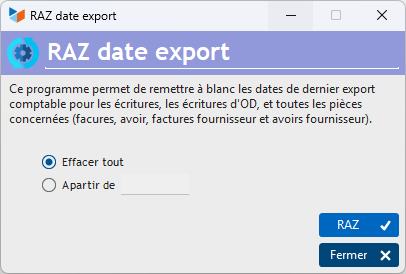
The button Reset button resets the date of the last accounting export to blank for journal entries, OD entries and all relevant documents (invoices, credit notes, supplier invoices and supplier credit notes).
You can either reset all dates to blank or reset dates to blank only from a specific date onwards. For example, if you carry out an export on 10/04, followed by an export on 10/05, both of which have been sent to the accountant, and if you accidentally need to amend accounting entries that affect the export (invoice or journal entry records), you can, for example, clear all export dates from 11 April onwards, which will allow you to generate a new ‘clean’ export on 11 May.
The XIMPORT format
The XIMPORT format is recognised by many accounting software programmes.
An XIMPORT file is an SDF (no fixed delimiter) text file; the size of a record must not exceed 137 characters.
An XIMPORT record is structured as follows:
| Description | Size | Type |
|---|---|---|
| Transaction No. | 5 characters | Numeric |
| Journal | 2 characters | Alphanumeric |
| Posting date | 8 characters | Date (YYYYMMDD) |
| Maturity date | 8 characters | Date (YYYYMMDD) |
| Document number | 12 characters | Alphanumeric |
| Account | 11 characters | Alphanumeric |
| Description | 25 characters | Alphanumeric |
| Amount | 13 characters | Numeric, 2 decimal places |
| Credit-Debit | 1 character | Alphanumeric (D or C)C |
| Transaction number | 12 characters | Alphanumeric |
| Analytical/budget code | 6 characters | Alphanumeric |
| Account name | 34 characters | Alphanumeric |
| Euro | 1 character | Alphanumeric |
| Version* | 4 characters | Alphanumeric |
* only for the Ciel 2003 format.
Numeric data is right-aligned; other data is left-aligned.
Example
53HA20090106200801062152        401000     Facture EDF 2152               1196.00C2152              Fournisseurs divers               O2003
53HA20090106        2152        606100     Facture EDF 2152               1000.00D2152              Fournitures non stock. eau, énergiO2003
53HA20090106        2152        445664     Facture EDF 2152                196.00D2152              Tva déductible 19.6 %             O2003
The WINFIC format
The Winfic format is used by WinFic, eWinfic and WinSis Compta (Fiducial Informatique).
The specifications for this file are available at this link.
Specific points
‘Account’ column in ECRITURE.WIN
The account is a 6-character string, formatted as follows:
- if the account in question falls under the configured customer summary account, the digit “9” followed by a suffix
- if the account in question falls under the configured supplier summary account, the digit “0” followed by a suffix
- in all other cases, it is the 6-character account number
The suffix is calculated as follows:
- if the customer ID differs from the subsidiary ledger account: it is the subsidiary ledger account
- otherwise:
- if the external customer reference is not specified, it is the customer ID
- if the external customer reference is provided, it is this external reference
The suffix (alphanumeric) consists of 5 characters, padded with zeros on the left where necessary.
The FEC format
Since 1 January 2014, French taxpayers who keep their accounts using computerised systems must submit them in the form of electronic files during a tax authority audit, in accordance with the standards set out in Article A.47 A-1 of the Book of Tax Procedures.
The DGFIP provides them with software called ‘Test Compta Demat’, which enables them to check compliance with the prescribed standards. It is available on le the Ministry of the Economy’s website. Dalloz has taken this opportunity to present another FEC validator, FEC Expert: the state introduces complex standards, the private sector manages the complexity of the standards, and the user foots the bill. Welcome to France…
The CPS tax (French Polynesia)
On 1 April 2022 (sic), a new surcharge came into force in French Polynesia, known as the CPS.
Gestan has supported CPS-type taxes since version 15.40.00/U10. You can generate all documents including this surcharge. For the XIMPORT export, there are no issues regarding VAT on debits, provided you specify in the settings the specific account you will be using (usually 44578 in France). However, for businesses subject to VAT on receipts, you will need to wait for version A1.00.00 of Gestan before the XIMPORT export correctly allocates payments in French Polynesia.  Verification in progress.
ℹ️ Other “Accounting” articles
Arrêtés de TVA
Balance
Balance tiers
Calcul de la TVA
Certification des logiciels de caisse
Clôture comptable / Exercices comptables
Comptabilisation des DEEE
Comptabilisation des écritures
Comptabilité avec Gestan : principes de base
Comptabilité en partie double
Compte bancaire et de caisse
Compte de résultat
Créances irrécouvrables
Encaissements/Décaissements
Export CFONB
Export SEPA
Export XIMPORT des données comptables
Facturation par taux de taxe
Grand Livre
Immobilisations
Imputations comptables
Journal
Journaux comptables (codes)
Lettrage
Liaisons comptables
Liaisons en masse : écritures
Micro-Entreprise / Auto-Entreprise
OD (opérations diverses)
Options des documents comptables
Paramétrage comptabilité
Pièces sans imputation
Plan comptable
Pointage TVA
Produits et Charges
Rapprochement bancaire
Relevés de compte bancaire
Remise de chèques
Revue des écritures
Soldes de gestion
Taux de TVA
Ticket Z
Trésorerie prévisionnelle *
Trésorerie simplifiée
Ventilation des factures par échéances
Ventilation des écritures
Ventilation détaillée par taux de taxe