Gestan base import
 A1 proofreading not yet effective for this page. In the meantime, you can ask any questions on the forum.
You can import a database from Gestan:
- to import data from removable media such as a USB key. In this case, the files in the DATABASE and DOCUMENTS directories of the source directory are automatically copied to the directories of the target directory.
- to return to a previous state from a compressed backup. In this case, the zip archive is decompressed, and the files in the archive permanently replace the corresponding files in the target directory (from the DATABASE and DOCUMENTS directories)
 In both cases, the base import is irreversible, it is up to you to check that you are not overwriting a valid base!
Using the screen
Access: Tools → Administration → Import a Gestan database.
It is necessary that the database versions be identical. To use a version of old data with a different format, you must first revert it to the new format.
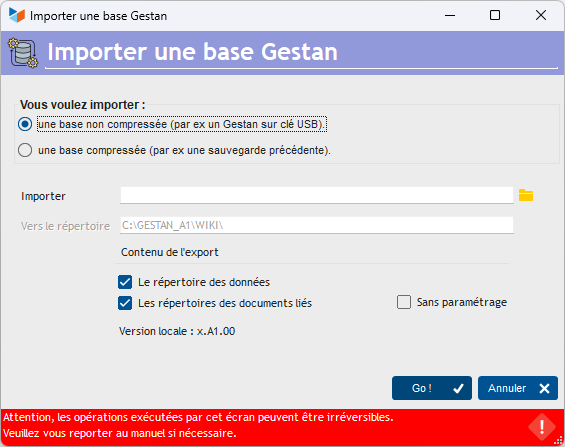
The selector allows you to choose the import of an uncompressed database, or the import of a compressed archive.
You must select in the Import field either the directory of the uncompressed database to import (the directory which contains the DATABASE and DOCUMENTS subdirectories), or the zip file to import.
The To directory field displays the directory to which the data will be imported, in this case the directory of the database to which you are connected.
Import Options
If you import an uncompressed database:
- if Data directory is checked, the DATABASE directory will be imported
- if Linked document directories is checked, the DOCUMENTS directory will be imported
- if No settings is checked, the general and user settings files will not be imported (this option should only be used by experienced Gestan administrators).
If you import a zipped database, the import procedure imports everything it finds in the archive: the contents of the DATABASE directory, that of the DOCUMENTS directory, or both.
 Other “Tools” articles
Connection to Gestan
Database minimization
Export Gestan database
Gestan base import
Gestan directory structure
Gestan on a USB stick
Gestan Versions
Import a chart of accounts
Import account assignments
Import contracts into Gestan
Import Google/Outlook/Notes contacts
Import parts into Gestan
Import product translations
Importing data into Gestan
Maintenance of HFSQL files
Mass Parts Removal
Quick start
Reallocation of contacts by region
Reassignment of users
Rebooking entries
Reset additional fields
Reset categories
Resetting files
Tips and tricks
Transfer your data to technical support
Zip the base